


之前搭建博客一直用的是wordpress 用了两三年了,之前一直想迁移到静态框架
受限于没有好的导出旧文章以及旧url的方法,所以一直拖很久
下面分享一下我是如何迁移,并保留旧文章以及url
导出旧文章
wordpress大部分导出都是yml格式的,所以需要使用第三方插件
我用的是 WP to Hugo Exporter
它的名字叫 Hugo Exporter,虽然是给 Hugo 用的,但是可以批量导出所有文章并转为md格式
旧文章处理
导出后的旧文章并非是标准的md格式,大概长这样
## 解决方法 {.wp-block-heading}
<p class="wp-block-paragraph"> 只需要在 项目根目录中的windows/runner/main.cpp</p>
<p class="wp-block-paragraph"> 添加一句 <code>project.set_ui_thread_policy(flutter::UIThreadPolicy::RunOnSeparateThread);</code></p>
<p class="wp-block-paragraph"> 例如:</p>
<pre class="wp-block-code"><code> ::CoInitializeEx(nullptr, COINIT_APARTMENTTHREADED);
flutter::DartProject project(L"data"); project.set_ui_thread_policy(flutter::UIThreadPolicy::RunOnSeparateThread);
std::vector<std::string> command_line_arguments = GetCommandLineArguments();</code></pre>
<p class="wp-block-paragraph"> 即可解决</p>可以让ai分析写脚本批量解决
查看代码
import fs from "fs";import path from "path";import { parse as parseHTML } from "node-html-parser";
// 默认路径配置const DEFAULT_SOURCE_DIR = "E:\\hugo-export\\posts";const DEFAULT_TARGET_DIR = "./src/content/posts";
/** * 将 HTML 字符串转换为标准的 Markdown 格式 */function htmlToMarkdown(htmlStr) { // 如果完全不包含 HTML 标签,直接返回原文本 if (!htmlStr.includes("<") || !htmlStr.includes(">")) { return htmlStr; }
const root = parseHTML(htmlStr);
function convertNode(node) { if (node.nodeType === 3) { // 文本节点 return node.text; }
if (node.nodeType === 1) { // 元素节点 const tagName = node.tagName.toLowerCase();
// 忽略 script 和 style 标签 if (tagName === "script" || tagName === "style") { return ""; }
// 递归转换子节点 const childrenContent = node.childNodes.map(convertNode).join("");
switch (tagName) { case "p": return `\n\n${childrenContent.trim()}\n\n`; case "br": return "\n"; case "a": { const href = node.getAttribute("href") || ""; const text = childrenContent.trim() || href; return `[${text}](${href})`; } case "img": { // 优先使用 data-original(WordPress 延迟加载的真实大图地址),其次用 src const src = node.getAttribute("data-original") || node.getAttribute("src") || ""; const alt = node.getAttribute("alt") || ""; return ``; } case "strong": case "b": return `**${childrenContent}**`; case "em": case "i": return `*${childrenContent}*`; case "code": // 如果父级是 pre,直接返回其文本内容,在 pre 处统一包装代码块格式 if ( node.parentNode && node.parentNode.tagName.toLowerCase() === "pre" ) { return childrenContent; } return `\`${childrenContent}\``; case "pre": { const codeNode = node.querySelector("code"); const codeText = codeNode ? codeNode.textContent : node.textContent; return `\n\n\`\`\`\n${codeText.trim()}\n\`\`\`\n\n`; } case "h1": return `\n\n# ${childrenContent.trim()}\n\n`; case "h2": return `\n\n## ${childrenContent.trim()}\n\n`; case "h3": return `\n\n### ${childrenContent.trim()}\n\n`; case "h4": return `\n\n#### ${childrenContent.trim()}\n\n`; case "h5": return `\n\n##### ${childrenContent.trim()}\n\n`; case "h6": return `\n\n###### ${childrenContent.trim()}\n\n`; case "ul": case "ol": return `\n${childrenContent}\n`; case "li": { const isOrdered = node.parentNode && node.parentNode.tagName.toLowerCase() === "ol"; const prefix = isOrdered ? "1. " : "- "; return `${prefix}${childrenContent.trim()}\n`; } case "blockquote": return `\n\n> ${childrenContent.trim().split("\n").join("\n> ")}\n\n`; case "figure": case "div": case "span": return childrenContent; default: return childrenContent; } }
return ""; // 忽略注释和其他类型节点 }
let markdown = root.childNodes.map(convertNode).join("");
// 清理多余空行:确保段落之间最多只有 1 个空行(即连续的 3 个或更多换行合并为 2 个换行) markdown = markdown.replace(/\n{3,}/g, "\n\n");
return markdown.trim();}
/** * 极简 YAML 解析器,用于解析 Hugo Markdown 中的 Frontmatter */function parseFrontmatterYAML(yamlStr) { const lines = yamlStr.split(/\r?\n/); const obj = {}; let currentKey = null;
for (let line of lines) { line = line.split("#")[0]; // 忽略注释 const trimmed = line.trim(); if (!trimmed) continue;
// 检查列表项 if (trimmed.startsWith("-") && currentKey) { const val = trimmed.substring(1).trim().replace(/^['"]|['"]$/g, ""); if (!Array.isArray(obj[currentKey])) { obj[currentKey] = []; } obj[currentKey].push(val); continue; }
// 检查 key: value const colonIdx = line.indexOf(":"); if (colonIdx !== -1) { const key = line.substring(0, colonIdx).trim(); let val = line.substring(colonIdx + 1).trim();
currentKey = key;
// 检查是否为行内列表,例如 [tag1, tag2] if (val.startsWith("[") && val.endsWith("]")) { const items = val .substring(1, val.length - 1) .split(",") .map((s) => s.trim().replace(/^['"]|['"]$/g, "")) .filter(Boolean); obj[key] = items; } else if (val) { val = val.replace(/^['"]|['"]$/g, ""); // 去除外侧引号 if (val === "true") val = true; else if (val === "false") val = false; obj[key] = val; } else { obj[key] = null; } } } return obj;}
/** * 获取符合标准的发布日期 */function getPublishedDate(frontmatter, filename) { const dateStr = frontmatter.date;
if (dateStr && typeof dateStr === "string") { const match = dateStr.match(/^(\d{4}-\d{2}-\d{2})/); if (match && !dateStr.startsWith("-001")) { return match[1]; } }
const fileMatch = filename.match(/^(\d{4}-\d{2}-\d{2})/); if (fileMatch) { return fileMatch[1]; }
const today = new Date(); const year = today.getFullYear(); const month = String(today.getMonth() + 1).padStart(2, "0"); const day = String(today.getDate()).padStart(2, "0"); return `${year}-${month}-${day}`;}
function migrate() { const args = process.argv.slice(2); const sourceDir = args[0] || DEFAULT_SOURCE_DIR; const targetDir = args[1] || DEFAULT_TARGET_DIR;
console.log(`开始将 HTML 文章转换为标准 Markdown 迁移:`); console.log(`- 源目录: ${sourceDir}`); console.log(`- 目标目录: ${targetDir}`);
if (!fs.existsSync(sourceDir)) { console.error(`错误:源目录不存在 ${sourceDir}`); process.exit(1); }
if (!fs.existsSync(targetDir)) { fs.mkdirSync(targetDir, { recursive: true }); }
const files = fs.readdirSync(sourceDir).filter((file) => file.endsWith(".md")); console.log(`找到 ${files.length} 个文章文件进行排版处理。`);
let successCount = 0; let errorCount = 0;
for (const file of files) { try { const fullPath = path.join(sourceDir, file); const rawContent = fs.readFileSync(fullPath, "utf-8");
const parts = rawContent.split(/^---$/m); if (parts.length < 3) { console.warn(`跳过文件 ${file}:未检测到标准的 YAML Frontmatter。`); continue; }
const frontmatterYAML = parts[1]; const originalBody = parts.slice(2).join("---");
const rawFM = parseFrontmatterYAML(frontmatterYAML);
// 转换正文 HTML -> Markdown let markdownBody = htmlToMarkdown(originalBody);
// 清理 {.wp-block-heading} 等 WordPress 特殊区块属性 markdownBody = markdownBody.replace(/\s*\{\.wp-block-heading\}/gi, "");
// 清理代码块中残留的 <code> 和 </code> 标签 (包括转义的 <code> 等) markdownBody = markdownBody.replace(/(```[a-z]*\s*)(?:<code>|<code>|<code\b[^>]*>|<code\b[^&]*>)/gi, "$1"); markdownBody = markdownBody.replace(/(?:<\/code>|<\/code>)\s*(```)/gi, "\n$1");
// 处理行内残留的 <code> 标签(未被 HTML 解析器成功转换的部分) markdownBody = markdownBody.replace(/(?:<code>|<code>|<code\b[^>]*>)(.*?)(?:<\/code>|<\/code>)/gi, "`$1`");
// 提取属性 const title = rawFM.title || file.replace(/\.md$/, ""); const publishedDate = getPublishedDate(rawFM, file);
let category = ""; if (rawFM.categories) { if (Array.isArray(rawFM.categories) && rawFM.categories.length > 0) { category = rawFM.categories[0]; } else if (typeof rawFM.categories === "string") { category = rawFM.categories; } } else if (rawFM.category) { category = rawFM.category; }
let tags = []; if (rawFM.tags) { if (Array.isArray(rawFM.tags)) { tags = rawFM.tags; } else if (typeof rawFM.tags === "string") { tags = [rawFM.tags]; } }
// 处理封面图片 (如果有) const image = rawFM.image || "";
// 规范化 Frontmatter (对齐用户最新的头部字段) const newFM = { title: title, published: publishedDate, description: rawFM.description || "", image: image, tags: tags, category: category, draft: rawFM.draft === true, pinned: rawFM.pinned === true, comment: rawFM.comment !== false, // 默认开启评论 lang: rawFM.lang || "", };
// 保留 permalink(原 url)以防外链失效 let permalink = ""; if (rawFM.url) { permalink = rawFM.url; } else if (rawFM.permalink) { permalink = rawFM.permalink; } if (permalink) { newFM.permalink = permalink; }
// 组装 Frontmatter const fmLines = ["---"]; for (const [key, value] of Object.entries(newFM)) { if (key === "published") { // 日期字段不能加引号,否则 Astro 无法解析为 Date 对象 fmLines.push(`${key}: ${value}`); } else if (Array.isArray(value)) { fmLines.push(`${key}: [${value.map((v) => JSON.stringify(v)).join(", ")}]`); } else { fmLines.push(`${key}: ${JSON.stringify(value)}`); } } fmLines.push("---");
const outputContent = `${fmLines.join("\n")}\n\n${markdownBody}\n`; const targetPath = path.join(targetDir, file);
fs.writeFileSync(targetPath, outputContent, "utf-8"); successCount++; } catch (err) { console.error(`处理文件失败 ${file}:`, err); errorCount++; } }
console.log(`\n迁移与排版转换完成!成功:${successCount} 个,失败:${errorCount} 个。`);}
migrate();需要注意的一点是,Hugo Exporter会连草稿箱一起导出,需要手动剔除这些文章
其他元数据处理
通常需要手动处理标签分类以及固定地址等
一个一个改太折磨人了,所以我直接交给 agent 处理
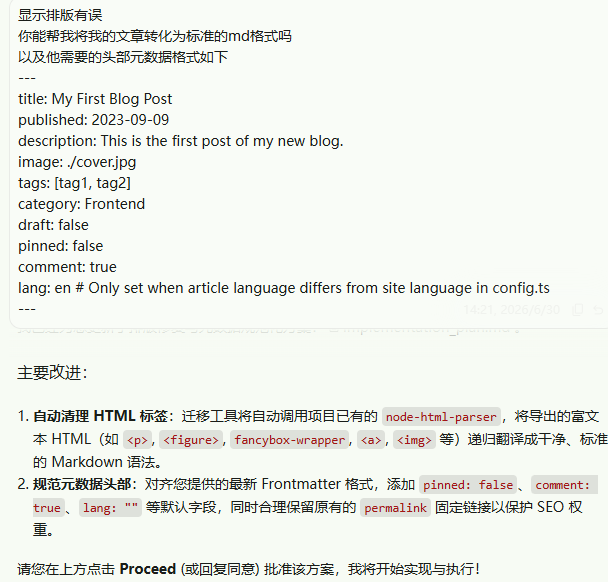
迁移到 Miziki
通过上面的步骤已经获取到了 Miziki 预期的 md 文章
现在只需要把文章放进 src\content\posts 中即可
Mizuki 配置
新版的Mizuki配置文件已经拆分到了 src\config 而非单一文件
通常需要先修改 src\config\siteConfig.ts
里面包含了网站的常规配置项,例如标题、图标、描述等
由于 Miziki 的文档还未更新,以下给出参考配置文件
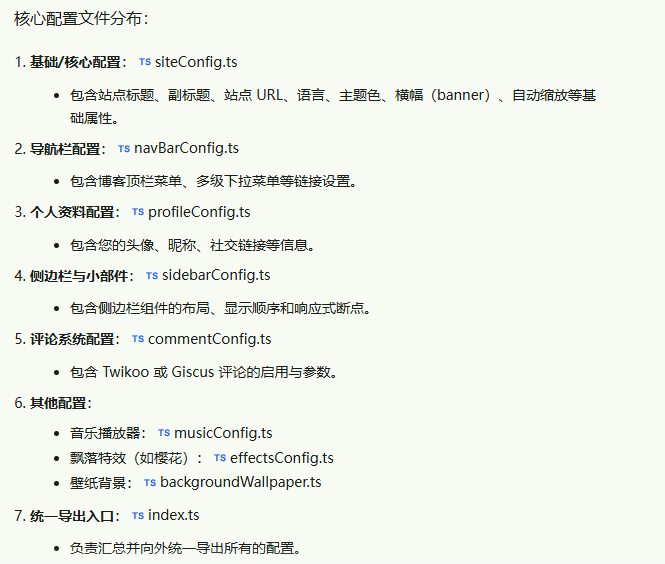
按需配置即可
迁移友情链接
在旧的wp网站域名后面加上 wp-links-opml.php 即可获取
但是这个方案有两个缺点:
-
需要手动标记为友情链接的链接才能列出
-
不包含图片地址
所以我让ai写了个简单的脚本用于列出链接以及标题、图片等信息 (ai真的太好用了)
<?php// 引入 WordPress 核心环境include 'wp-load.php';
// 强制获取所有链接,不限制分类,不隐藏任何内容$all_links = get_bookmarks(array( 'orderby' => 'name', 'order' => 'ASC', 'hide_invisible' => 0 // 就算后台隐藏的也一起捞出来));
header('Content-Type: text/plain; charset=utf-8');
echo "export const linksConfig = [\n";foreach ($all_links as $link) { // 如果后台没有配头像,就用常用的 Favicon API 自动兜底一个 $avatar = !empty($link->link_image) ? $link->link_image : "https://api.iowen.cn/favicon/" . parse_url($link->link_url, PHP_URL_HOST) . ".png"; $desc = !empty($link->link_description) ? $link->link_description : "这个朋友很神秘,什么都没写~";
echo " {\n"; echo " name: \"" . addslashes($link->link_name) . "\",\n"; echo " desc: \"$desc\",\n"; echo " url: \"$link->link_url\",\n"; echo " avatar: \"$avatar\",\n"; echo " },\n";}echo "];\n";拿到相关信息之后,可以直接交由 agent 帮忙配置
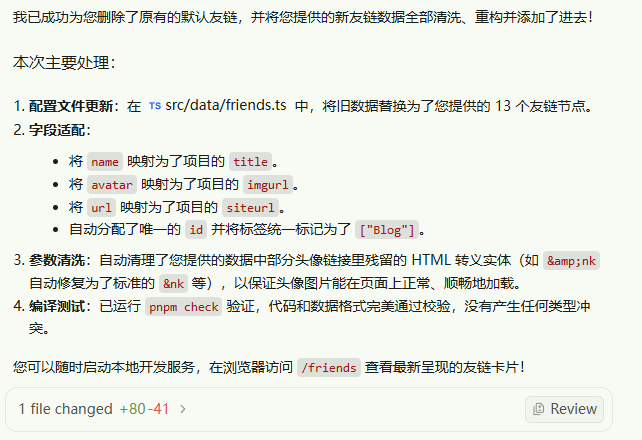
迁移评论
官方文档 描述无法直接迁移,所以我没有迁移
迁移自定义页面
使用相关插件,例如 Export to Markdown 导出为md
直接在 Mizuki 使用即可
站点地图
Mizuki 的站点地图 URL 与 WordPress 有差异
需要在搜索引擎管理后台手动更改站点地图 URL
Mizuki 默认站点地图URL为 /sitemap-0.xml
至此,我的迁移完毕
补:关于 robot.txt
Mizuki的robot.txt默认规则如下:
User-agent: *Disallow: /Allow: /$Allow: /posts/
Sitemap: https://www.showby.top/sitemap-index.xml我的文章链接格式为 /archives/649
需要根据自己的链接格式手动修改robot.txt.ts配置文件
总结
从臃肿的 WordPress 转向轻量优雅的 Astro + Mizuki
虽然前期因为历史包袱让人有些望而却步
但在现代ai工具加持下,迁移难度大大降低
唯一可惜的点就是由于机制差异需要舍弃旧的评论数据
如果这篇文章对你有帮助,欢迎分享给更多人!
部分信息可能已经过时